How to create a Program
Objective:
The objective of this training manual is to provide step-by-step guidance on creating a new Program record in Salesforce. Program records are used to manage various initiatives, projects, or campaigns within an organization, allowing for streamlined tracking and management of resources, timelines, and outcomes.
A program is a group of related projects managed in a coordinated way and designed to achieve or contribute to a long-term Strategic Impact Priority.
Audience:
This manual is intended for Salesforce users who have permissions to create and manage Program records.
Pre-requisites:
Before proceeding with creating a new Program record, ensure you have:
- Access to Salesforce with appropriate permissions to create records.
- Necessary information about the program, including its name, start date, end date, objectives, and any additional details required for tracking and reporting purposes.
Steps to Create a New Program Record:
Step 1
Log in to Salesforce: https://olive.my.salesforce.com/
- Open your web browser and navigate to the Salesforce login page.
- Enter your username and password, then click “Log In.”
Step 2
Navigate to the Programs Object:
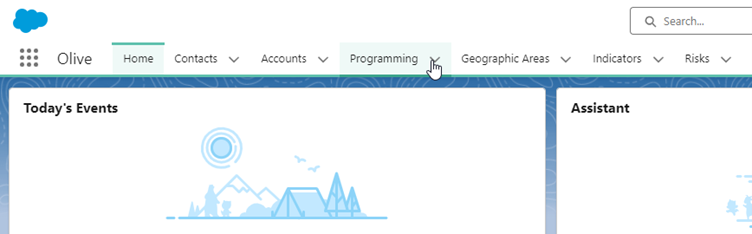
1. On your Olive Dashboard, click on the “Programming” tab:
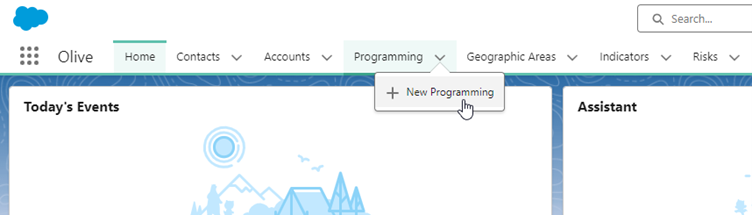
2. Click on “New Programming”
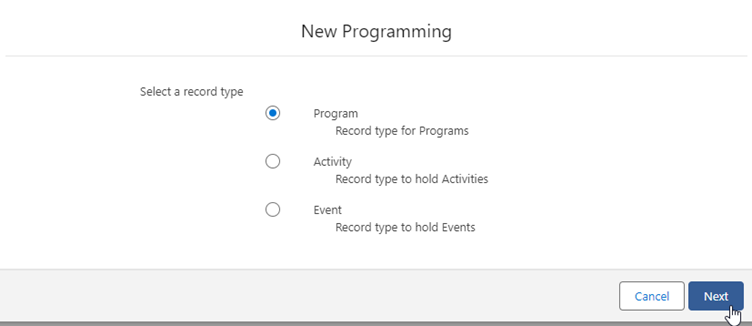
3. Select the “Program” record type and click on “Next”
4. Complete the “New Programming: Program” information and click on “Save”
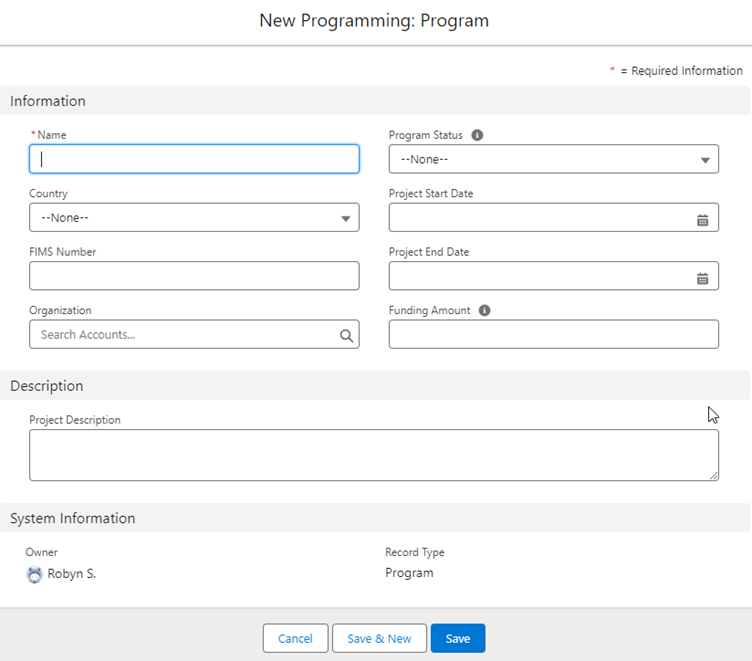
| Field Name | Details |
| Name | Name of the program |
| Country | Which country the new program is for |
| FIMS Number | The Financial Information Management System number |
| Organization | Which organization the program is for |
| Program Status |
The current status of the program: – Design – Implementation – Monitoring – Evaluation – Closed |
| Project Start Date | Start date of the project |
| Project End Date | End date of the project |
| Funding Amount | Total amount of funding available for the project |
| Project Description | Provide a brief description of the program, including its purpose and intended outcomes |
Step 3:
Verify the Program Record:
- Once saved, review the program record to ensure all information is accurate.
- Make any necessary edits by clicking on the “Edit” button.
Step 4:
Associate Related Records (Optional):
- If the program is associated with other records in Salesforce (e.g., campaigns, opportunities, accounts), navigate to those records and link them to the program record.
Step 5:
Ensure Data Consistency and Compliance:
- Ensure that the information entered for the program record aligns with your organization’s data standards and naming conventions.
- Verify compliance with any applicable data regulations or internal policies regarding the management of program data.
Step 6:
Train Users (Optional):
- If other users will be creating Program records, consider providing them with training based on this manual to ensure consistency and accuracy in data entry.
Conclusion:
Creating a new Program record in Salesforce is a straightforward process that involves entering relevant information into the program record form. By following the steps outlined in this manual, users can efficiently manage various initiatives or projects within their organization, facilitating better tracking, reporting, and decision-making. Remember to maintain data consistency and compliance throughout the process to ensure the integrity of your program data.